Tuesday, March 15, 2016
Trik Cara Cepat Mendapatkan Megical Chest Di Game Clash Royale
Cara Cepat Mendapatkan Megical Chest Di Clash Royal - Chest atau harta karun merupakan item penting yang berada di game Clash Royale. Di dalam Box harta karun tersebut berisi banyak hadiah yang sangat menarik seperti Kartu Hero yang kemungkinan kita mendapatkan kartu hero tertinggi dan terkuat class epic dan rare, berisi banyak Gold, Gems dan lain-lain. Bagaimana? tertarik dengan artikel

situs download gambar gratis

situs download gambar gratis - kalau di blog kita gak ada gambar tentu pasti kurang menarik apalagi hanya isi text saja. sebuah gambar itu mewakili apa yang ada pada sebuah situs agar si pembaca mudah memahami dan senang melihat situs yang di baca, nah pada kesempatan kali ini saya akan membagikan situs-situs penyedia gambar gratis dengan licensi terbuka, bisa di copy, di edit, di share di banyak situs, buat personal ataupun tujuan comersil tanpa meminta ijin langsung pada yang punya hak cipta.
kumpulan situs download gambar gratis
1. stocksnap.io
Licensi:
All photos on StockSnap fall under the Creative Commons CC0 license. That means you can copy, modify, distribute any photo on the site, even for commercial purposes, all without asking permission!

licensi:
I offer my pictures under the same terms as Creative Commons Zero with the common sense differences/limitations that you can’t use any of my images for pornographic, criminal, defamatory or degrading purposes, you can’t use or redistribute my images on free stock photo websites or apps, you can’t sell and/or redistribute my pictures implying you're the photographer, and you can't sell and/or redistribute my pictures as stock photography. So you can create awesome work without needing to spend a dime and freely use my pictures for personal or commercial projects without any strings attached. I don’t require any attribution, but it is always appreciated ;) If you have any questions please do not hesitate to contact me.

licensi:
This is a license agreement between you and FreeImages.com that explains how you can use photos, illustrations and vectors that you license from FreeImages.com. By downloading content from FreeImages.com, you accept the terms of this agreement. Read More. . .

4. unsplash.com
Licensi:
All photos published on Unsplash are licensed under Creative Commons Zero which means you can copy, modify, distribute and use the photos for free, including commercial purposes, without asking permission from or providing attribution to the photographer or Unsplash.

Licensi:
free personal and commercial use.

Licensi:
All Clipart on Openclipart are available for unlimited commercial use. That means you may use the clipart commercially, for education, for church, for school, for your job, or even to manufacture products globally.

Licensi:
All the photos and raw files on this website are distributed under the CC0 creative commons license. That means that you can copy, modify, distribute and perform the work, even for commercial purposes, all without asking permission or give attibution.

Licensi:
free high-resolution photos. no copyrights restrictions. images for personal commercial use.

Licensi:
under creative commons (CC)

photo by: Chris Willis
10. freedigitalphotos.net
Our free photos and illustrations are ideal for business, personal and educational use. Every image is free, with an option to buy larger images at reasonable prices.

11. stockvault.net

11. stockvault.net

Licensi:
Free mobile photos for your personal or commercial projects

Free mobile photos for your personal or commercial projects

Monday, March 14, 2016
Download Game Clash Royale APK Untuk Android Update Terbaru Dan Review
Download Clash Royale Apk Android Dan Review - Akhirnya game Clash Royal For Android rilis secara global yang sudah dapat dimainkan di negara mana saja. Menurut informasi perilisan pertama game Clash Royal baru bisa dinikmati di negara tertentu yang terpilih.
Clash Royale merupakan game yang di developeri oleh pihak Supercell yang merupakan developer clash of clans, karena developernya
how to add javascript to google sites

how to add javascript to google sites - The following is the recommended way by google if you want to storing Javascript files in google code
Installing TortoiseSVN
Visit this site https://tortoisesvn.net/downloads.html. Download and install the application. Once installed, the computer must be restarted for this application will be integrated with the context menu / right click menu (shell command).
Then right-click on the desktop. Select the TortoiseSVN -> Settings:

Dialog box will appear like this. Click on General and click the Edit button:

Once the config file is open, copy this code and place it under comment # Makefile = svn:eol-style=native
Save the changes you did. Allow up here first
Creating a New Project Page
If you do not have a Google account, created first in order to get access to Google Code. Visit http://code.google.com, and then click Create A New Project:


Click Create Project. You'll be taken to your new project dashboard page if it is successful. Click the Source tab and then click the link to create a password googlecode.com password. It is used to connect the application with your Google project:

Record the password that appears:

Start Uploading
Open the TortoiseSVN application by right clicking on the desktop and select TortoiseSVN » Repo Browser:

Will display a dialog box to enter the URL of the project:
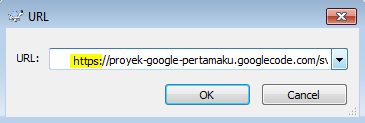
URL pattern is always shaped like this:
https://project_name.googlecode.com/svn/trunk/
To be remembered and most often made failed in file upload: When writing the URL in the application project, using https, but when you want to see the results or access their work online, use the http
Click OK. Wait until the loading process is complete.
Open the folder where you want to upload the file there. Drag the file you want to upload the file list area:

Wait a moment, you will be prompted to authenticate your Google account code like this:

Fill your email address and password that you've previously recorded. check the Save authentication so that we do not need to repeatedly log in when uploading files in the future.
If the file is successfully uploaded it will look like the following.

Click on the name of the file that has been uploaded (1)
Copy the link on the address bar (2) and then replace the main Javascript link of the theme
Special Thanks to Taufik Nurrohman for great Article :
Cara Mendapatkan GEMS Clash Royale Gratis Update Terbaru
Cara Mendapatkan Gems Clash Royal Gratis - Supercell yang merupakan developer clash of clans membuat game terbaru yang mirip dengan clash of clans namun bukan penggani clash of clans. Game Clash Royal merupakan game turunan dari clash of clans atau COC karena memang COC lebih tenar terlebih dahulu. Baca artikel ini sampai habis karena penulis akan membagikan trik mendapatkan gems clahs royale
Wednesday, March 9, 2016
situs penyedia bitcoin 1000 satoshi

Situs penyedia bitcoin 1000 satoshi - Mencari dollar di internet itu banyak sekali caranya, salah satunya dengan menambang bitcoin di situs-situs penyedia bitcoin, caranya mudah tinggal kunjungi ikuti instruksi yang di sediakan webnya tapi biasanya masukkan alamat bitcoin, isi captcha dengan benar dan tekan tombol reward udah deh... bitcoin udah dapet simpelkan. Nah! kebetulan aku juga menyediakan situs tambang bitcoin, tinggal isi bitcoin address, fill captcha, push ok. sudah dapet deh bitcoinnya. aku kasih 1000 satoshi setiap 30 menit coba deh...... nama situsnya: brobitcoin.faucetfly.com dan dapatkan 30% komisi referral setiap orang yang mengunjungi situs dari link referral kalian

copy paste link gambar di bawah ini sebagai banner

You can earn 30%, share your referal link: http://brobitcoin.faucetfly.com/?r=alamat bitcoin anda
Tuesday, March 8, 2016
Macam Cara Promosi Blog

macam-macam cara promosi blog, mempromosikan sebuah blog atau website itu pasti kewajiban karna tanpa memberi tahu ke khalayak umum yakin pasti blog atau website kita gak ada yang mengunjungi dan membaca alias menjadi sampah di internet saja. oleh karna itu pada kesempatan ini saya akan membagikan macam-macam cara mempromosikan blog atau website moga dengan cara ini blog kita bisa jadi tambah ramai dan banyak pengunjungnya
1. update blog
sesering mungkin mengisi artikel pada blog kita agar pengunjung tidak bosan!.
2. jejaring sosial
buat macam-macam jejaring sosial seperti facebook, twitter, google+, pinterest, instagram, tumblr dll. promosikan blog atau website kalian di dalam jejaring sosial tersebut.
3. signup ke berbagai macam forum atau group
tulis artikal dan link-kan ke blog atau website kalian.
4. komen di blog
hal yang sangat mudah untuk memperbanyak pengunjung yaitu mengomentari blog yang kita kunjungi tapi ingat! jangan sampai SPAM, berkomentarlah dengan sopan dengan ini para pembaca bisa mengunjungi blog kita.
5. submit ke search engine
submite ke google, yahoo, bing dan search engine yang lain.
6. setup feedburner
tambahkan widget subcribe pada blog atau website.
7. gunakan gambar profil yang sama
tujuannya agar mudah di kenali oleh para pengunjung.
8. buat tombol subcribe ke email kita
setiap ada artikel baru langsung terkirim ke email pengunjung.
9. gabung ke blog hop
kunjungi blog dan tinggalkan komentar.
10. gunakan layanan social bookmarking
social bookmarking yang populer seperti stumbleupon, digg dan delicious.
11. beri tag pada blog atau website.
12. buat video khusus untuk blog atau website
poskan ke youtube dan beri link ke blog atau website kita.
13. biasakan menulis original artikel(murni tulisan kita sendiri )
tanpa copy paste dari situs atau blog yang lain
14. mengulas artikel dari blog atau website
penting! tulis link originalnya.
15. beri daftar isi dari blog atau website.
16. buat sebuah ebook
buat ebook mengenai artikel atau blog kita.
17. menjawab pertanya'an pengunjung
merespon setiap pertanya'an dari pengunjung blog berarti owner blog respect pada pengunjung.
18. tulis mengenai halaman situs kita
beritahu pengunjung sedikit tentang penulis.
19. popular post atau artikel
pengunjung bisa dengan mudah mencari isi dari blog.
20. menjawab pertanya'an
sign up ke berbagai situs yang menyediakan pertanya'an
dan jawab. seperti yahoo! answers
21. responsive blog
ini akan memperbanyak traffic pengunjung dari berbagi macam device yang di pakai browsing
22. jaga kualitas blog
tetap menjaga isi dari kualitas blog sangatlah penting.
Subscribe to:
Posts (Atom)